SBI KYC Update Online: KYC, or “Know Your Customer,” is essential for verifying the identity of clients in financial services. Several banks, including the State Bank of India (SBI), allow customers to update their KYC details online. Updating KYC is crucial for accessing various financial products, such as mutual funds, fixed deposits, and more.
With the rise in banking frauds, frequent KYC updates help prevent financial scams. According to the Reserve Bank of India (RBI) notification dated February 25, 2016, every bank account holder must update their KYC. Failing to do so can result in account suspension.
Table of Contents
For SBI account holders, KYC updates can be done online through the SBI net banking platform or the YONO app, saving you the hassle of visiting a branch. Here’s how to do it:
How to Update SBI KYC Online?
Updating KYC online ensures a smooth banking experience and protects against financial scams. Follow these steps to update your SBI KYC online:
How to Update SBI KYC Online Through Internet Banking?
Step 1: Log in to SBI Online Personal banking.
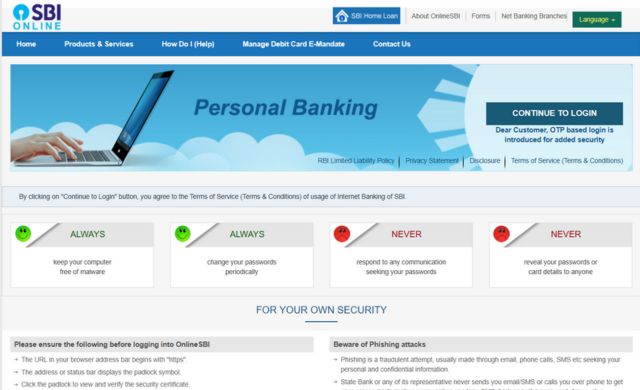
Step 2: Navigate to the My Accounts & Profile section and click on Update KYC.
Step 3: Select your SBI account and click Next.
Step 4: Fill out the required information, upload the relevant documents, and submit.
Step 5: Enter the OTP sent to your registered mobile number to complete the KYC update.
Suggested Read: What is a Cancelled Cheque?
How to Update SBI KYC Through YONO App?
The YONO app offers a convenient way for SBI account holders to update their KYC details. Follow these steps:
Step 1: Download or Open the SBI YONO App and Log in with your MPIN.

Step 2: Access the menu on the top left of the home screen and choose Service Request.
Step 3: Click on the Update KYC Option.
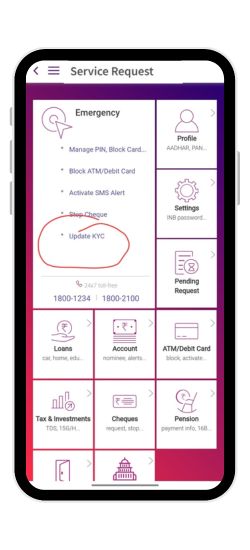
Step 4: Submit your profile password and click Submit.
Step 5: Enter the necessary information, upload the required documents, and submit.
Step 6: Enter the OTP sent to your registered phone number and click Submit.
Step 7: Receive a confirmation message indicating successful KYC update.
Suggested Read:
- How to Apply for Business Loan Online?
- RBI Approved Loan Apps In India
- Download e-PAN Card: Get Your PAN Card Digital
Required Documents for SBI bank KYC Update Online for Individual Account Holders:
You need to upload the following documents for updating your KYC with SBI:
- Voter’s Identity card
- Aadhaar card
- Passport
- NREGA card
- Driving licence
Required Documents for SBI KYC update for Minor Account Holders:
- Identity proof of the individual person who managing the minor’s account (can include any of the ID proofs listed above)
Additional Documents for NRI Account Holders:
NRI account holders need to submit documents verified by:
- Indian Embassy
- Notary Public
- Foreign offices
- Any correspondent bank officer’s signature verified through a Forex handling bank branch.
Check Your Credit Score in Free
How to Update SBI KYC Details Offline
If you prefer to update your KYC details offline, visit your nearest SBI branch with your original KYC documents and a photo. You may need to fill out the Annexure C-Self Declaration form if there are changes in your address.
Also Check SBI Bank Business Loan Online
How to Update KYC if Previous Details Are Not Updated
If your previously submitted KYC details are not showing up in your SBI account, you can quickly resolve this by visiting your nearest SBI branch. Simply fill the details and submit a self-declaration form, known as Annexure A. This form can be easily downloaded from the State Bank of India’s official website.
Why is it Essential to Update KYC Information with SBI?
- Prevent Account Freezing: Failure to update KYC can result in your account being frozen, restricting withdrawals and transfers.
- Compliance with RBI Guidelines: Regular KYC updates are mandated by the RBI to ensure account security and compliance.
- Address Change KYC: If you need to update your residence address, submit your KYC documents through DigiLocker following these steps:
- Log in to your SBI Card Online Account at SBI Card Address Change.
- Go to the Address tab and click on Update.
- Verify digitally through DigiLocker and confirm your new address.
Related Articles:
- SBI Bank Balance Check Number
- ICICI KYC Update Online: Here’s How To Update Your ICICI Bank KYC?
- Bank of Baroda KYC Update Online
- hdfc bank balance check Number
- How to Get Canara Bank Mini Statement Online
- Check how to get Bank of Baroda Mini Statement
FAQs
Q.1 How to update kyc Online in SBI?
Yes, you can update the SBI Bank KYC online. Simply you have to log into the SBI YONO app or update KYC Online Via net banking.
Q.2 What is a full form of KYC?
KYC Stands for Know Your Customer.
Q.3 Is KYC mandatory?
Yes, it’s a regulatory and legal requirement.
Q.4 Is there an online facility to update KYC for SBI?
Yes, you can update your KYC online via the YONO app or SBI net banking.
Q.5 How to update SBI KYC Online without going into the bank?
Submit the required documents (ID proof) online via the YONO app or SBI net banking. If visiting the branch, fill out and submit the KYC form along with the documents.
Q.6 What will happen if you do not update your SBI bank KYC?
Failure to update KYC can result in your SBI account being blocked or frozen due to non-compliance.
Q.7 What is the sbi customer care number?
SBI customer care number: Call on SBI’s 24X7 helpline number i.e. 1800-1234, 1800-2100, 1800-11-2211, 1800-425-3800.
Q.8 How to Download the SBI KYC Form?
You may collect the form from the nearest SBI branch to collect the KYC form. Otherwise, you can also download the SBI KYC form from the SBI’s official website, take a printout of it, fill it and submit it to the bank.
Q.9 What is e-KYC in SBI?
To update KYC in SBI, log in through YONO or net banking and give your personal details in the relevant boxes. Complete the form and submit it for processing.
Q.10 How to check KYC status in SBI online?
To check your CKYC number and status online you can visit the SBI Website / Mobile App. Login to your SBI Account and follow the steps below: Go to My Profile and click on ‘CKYC Details. ‘ (A masked ‘CKYC Number’ will appear).
Q.11 How many days does SBI take to update KYC?
Once you have submitted the KYC documents to the bank branch, the bank will take some time to verify the details.